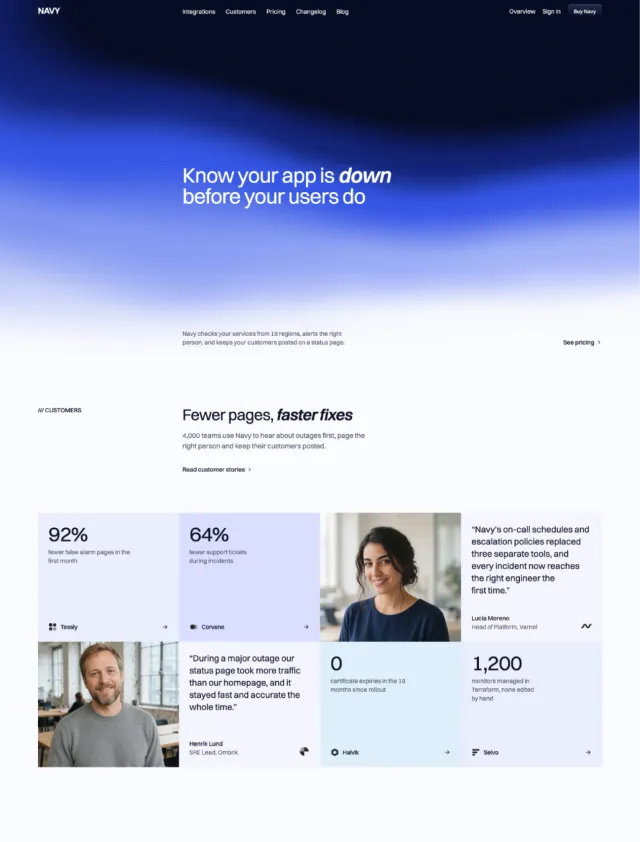
How to build a responsive Bento grid with Tailwind CSS
Build a responsive Bento grid with Tailwind CSS, using column and row spans that adapt across breakpoints. Copy-and-paste examples included.
Michael Andreuzza 5 min read
Contents
The “Bento grid” is a popular card layout pattern that uses CSS Grid with intentional column and row spans to create a dynamic, magazine-like composition. With Tailwind CSS, you can make a Bento layout responsive by:
- Defining a mobile-first single-column grid.
- Increasing columns at
mdandlgbreakpoints. - Applying responsive
col-span-*androw-span-*utilities per item.
Component-by-component walkthrough
Grid container (mobile-first)
Use a single-column grid by default and add spacing between items.
<div class="grid grid-cols-1 gap-2">
  <!-- items here -->
</div>
Responsive columns at breakpoints
Scale the grid from 1 → 4 → 6 columns at md and lg.
<div class="grid grid-cols-1 md:grid-cols-4 lg:grid-cols-6 gap-2">
  <!-- items here -->
</div>
Featured card spans
Highlight important items by spanning multiple columns/rows.
<article class="md:col-span-2 md:row-span-2 rounded-xl shadow p-6">
  <!-- Tall feature card -->
</article>

<section class="lg:col-span-2 rounded-xl shadow p-6">
  <!-- Wide card on large screens -->
</section>
Media fit and aspect
Ensure visuals fill their containers without distortion.
<img
  class="size-full object-cover rounded-xl"
  src="/path/to/image.jpg"
  alt="Descriptive alt"
/>
Tip: If you’re not using Tailwind’s size-* utilities, replace with w-full h-full.
Why this works
- Grid columns grow with breakpoints:
grid-cols-1on mobile,md:grid-cols-4, thenlg:grid-cols-6for wide screens. - Feature cards span space where it matters using
md:col-span-2,md:row-span-2, orlg:col-span-2to create visual rhythm. - Media fills its container using
object-cover,size-full(orw-full h-full) to maintain shape across sizes.
Customizing the Bento
- Change the grid rhythm: vary which cards use
col-span-2orrow-span-2atmd/lgto rebalance the composition. - Keep copy scannable: use short headings (
text-base/text-xl) andtext-smbody for denser grids. - Use outlines subtly:
outline outline-zinc-100adds soft separation without heavy borders. - Control heights: if you want consistent track sizing, consider
grid-auto-rows(e.g.auto-rows-[8rem]) and adjust spans to match your desired proportions.
Accessibility and polish
- Provide meaningful alt text for all images; remove decorative images from the accessibility tree with
alt=""if needed. - Ensure headings are structured (one
h1for the page,h2/h3for card titles within the grid). - Buttons and links should have clear labels and focus styles (
focus-visible:*).
Minimal starter (5 items)
Use this as a lighter starting point and tweak spans:
<div class="grid grid-cols-1 md:grid-cols-4 lg:grid-cols-6 gap-2">
  <div class="md:col-span-2 md:row-span-2 p-6 rounded-xl shadow bg-background">
    A
  </div>
  <div class="p-6 rounded-xl shadow bg-background">B</div>
  <div class="p-6 rounded-xl shadow bg-background">C</div>
  <div class="md:col-span-2 p-6 rounded-xl shadow bg-background">D</div>
  <div class="lg:col-span-2 p-6 rounded-xl shadow bg-background">E</div>
  <!-- Add more items as needed -->
  <!-- On mobile these stack; on md they flow into 4 cols; on lg into 6 cols. -->
  <!-- Adjust spans per breakpoint to change the feel of the layout. -->
</div>
That’s it—you now have a flexible, responsive Bento grid using Tailwind CSS. Tune spans per breakpoint to guide attention, keep copy tight, and let visuals breathe.
Full copy-paste example (responsive Bento grid)
Replace image paths with your own assets. The layout falls back to a single column on mobile, then expands to 4 columns at md and 6 columns at lg while selected items span multiple columns/rows.
<div class="grid grid-cols-1 md:grid-cols-4 gap-2 lg:grid-cols-6">
  <div
    class="flex flex-col justify-between h-full overflow-hidden shadow bg-linear-180 outline outline-zinc-100 from-zinc-50 to-zinc-100 rounded-xl md:col-span-2 md:row-span-2"
  >
    <div class="mx-8 -top-2">
      <img
        class="w-full h-full shadow rounded-b-xl"
        src="https://oxbowui.com/widgets/activity.svg"
        alt="Activity overview"
      />
    </div>
    <div class="relative p-8">
      <p
        class="text-xs relative font-medium uppercase tracking-wide text-zinc-500"
      >
        Integration
      </p>
      <h3 class="text-base mt-4 font-medium text-zinc-900">
        Effortless integration
      </h3>
      <p class="text-sm mt-2 font-medium text-zinc-500">
        Connect your favorite tools in seconds and keep your workflow unified
        and simple.
      </p>
    </div>
  </div>

  <img
    class="object-cover object-left shadow rounded-2xl size-full"
    src="https://oxbowui.com/widgets/hits.svg"
    alt="Traffic and hits chart"
  />

  <img
    class="object-cover object-left shadow rounded-2xl md:row-span-1 lg:row-span-1 size-full"
    src="https://oxbowui.com/widgets/device.svg"
    alt="Devices chart"
  />

  <div
    class="relative flex flex-col justify-center h-full p-8 overflow-hidden text-center shadow bg-linear-180 outline outline-blue-100 from-blue-50 to-blue-100 rounded-xl md:col-span-2"
  >
    <div>
      <img
        class="h-12 mx-auto"
        src="https://oxbowui.com/images/oxbow/oxbowLogo.png"
        alt="Oxbow logo"
      />
      <h3 class="text-xl sm:text-xl md:text-2xl mt-4 font-medium text-zinc-900">
        Connect your app
      </h3>
      <p class="mt-2 font-medium text-zinc-500">
        Connection secure, fast and easy. You can disconnect at any time.
      </p>
      <div class="flex justify-center mt-8">
        <button
          class="relative flex items-center justify-center text-center font-medium transition-colors duration-200 ease-in-out select-none focus-visible:outline-2 focus-visible:outline-offset-2 focus-visible:z-10 justify-center rounded-md text-zinc-600 bg-zinc-50 outline outline-zinc-100 hover:bg-zinc-200 focus-visible:outline-zinc-600 h-9 px-4 text-sm"
        >
          See our integrations
        </button>
      </div>
    </div>
  </div>

  <div
    class="flex flex-col justify-between h-full overflow-hidden shadow bg-linear-180 outline outline-zinc-100 from-zinc-50 to-zinc-100 rounded-xl md:row-span-2 lg:col-span-2"
  >
    <div class="relative p-8">
      <p
        class="text-xs relative font-medium uppercase tracking-wide text-zinc-500"
      >
        Experience
      </p>
      <h3 class="text-base mt-4 font-medium text-zinc-900">
        Unified experience
      </h3>
      <p class="text-sm mt-2 font-medium text-zinc-500">
        Enjoy a seamless journey across all your apps and devices, with
        everything working together.
      </p>
    </div>
    <div class="mx-8 -bottom-2">
      <img
        class="w-full h-full shadow rounded-t-xl"
        src="https://oxbowui.com/widgets/activity.svg"
        alt="Activity summary"
      />
    </div>
  </div>

  <div
    class="flex flex-col justify-between h-full overflow-hidden shadow bg-linear-180 outline outline-zinc-100 from-zinc-50 to-zinc-100 rounded-xl md:row-span-2 lg:col-span-2"
  >
    <div class="relative p-8">
      <p
        class="text-xs relative font-medium uppercase tracking-wide text-zinc-500"
      >
        Scheduling
      </p>
      <h3 class="text-base mt-4 font-medium text-zinc-900">Smart scheduling</h3>
      <p class="text-sm mt-2 font-medium text-zinc-500">
        Let automation handle your calendar and reminders, so you can focus on
        what matters most.
      </p>
    </div>
    <div class="mx-8 -bottom-2 -">
      <img
        class="w-full h-full shadow rounded-t-xl"
        src="https://oxbowui.com/widgets/report.svg"
        alt="Report summary"
      />
    </div>
  </div>

  <img
    src="https://oxbowui.com/widgets/progressCircles.svg"
    alt="Progress circles"
    class="shadow size-full rounded-2xl lg:col-span-2"
  />

  <div
    class="p-8 shadow bg-linear-180 outline outline-blue-100 from-blue-50 to-blue-100 rounded-xl lg:col-span-3"
  >
    <h3 class="text-base font-medium text-zinc-900">Always in sync</h3>
    <p class="text-sm mt-2 font-medium text-zinc-500">
      All your changes are saved automatically, so you never lose your progress
      or momentum.
    </p>
  </div>

  <div
    class="p-8 shadow bg-linear-180 outline outline-blue-100 from-blue-50 to-blue-100 rounded-xl lg:col-span-3"
  >
    <h3 class="text-base font-medium text-zinc-900">Plan your day</h3>
    <p class="text-sm mt-2 font-medium text-zinc-500">
      Stay organized and ahead with smart scheduling and automated reminders for
      every task.
    </p>
  </div>
</div>